

.pbix to .pbip is no longer just about human teams collaborating. It is about letting AI agents build and fix reports. If your files are locked in the old format, AI tools cannot help you.
A PBIX file is a sealed moving box: the data, the design, and the calculations, all taped inside one package. For three years, the case for switching to PBIP was that Git (think of it as “track changes” for teams) can’t see inside a sealed box the way it can flip through loose pages. That argument was always true. It’s just no longer the interesting one. PBIP matters now because an AI agent can’t see inside that box either, and in June 2026 Microsoft shipped the pieces that let one open a report, edit it, look at the result, and try again. That loop only runs on files that something other than Power BI Desktop can read.
Most teams haven’t noticed yet, because they’re still having the 2023 conversation about who overwrote whose changes.
One definition first, because “agent” now gets stretched to cover almost anything:
By “agent,” I don’t mean a chatbot that answers questions about your report. I mean a system that can inspect a project’s files, change them, run a tool, look at what came out, and keep going until the thing it was asked for is actually done.
That distinction carries the rest of this argument. Copilot answering a question about a semantic model needs nothing from your file format. An agent authoring a report needs everything from it.
A PBIX file packs your semantic model, your report design, and, if you’re importing data, the cached data itself into one zipped, sealed package. Git can tell that the box got heavier. It can’t tell you what’s different inside it. Two people editing the same report is two people repacking the same box separately: one version wins, the other gets left on the curb.
PBIP unpacks the same content into a folder of ordinary text files instead: one for the data model (a format called TMDL), one for what the report looks like (PBIR), and a small file tying the two together. Git reads text line by line, so it can show exactly what changed and merge two people’s edits automatically most of the time.

That was reason enough for teams doing serious review work on their reports. It wasn’t reason enough for everyone. Then the audience for a readable file changed.
If you’re already pointing an AI coding agent at a live semantic model, that works because the model is sitting open somewhere the agent can reach, in Desktop, or deployed to a workspace. There’s no equivalent for a PBIX sitting closed on a hard drive. You can technically pry one open like a zip file, but that’s an unsupported trick that can quietly corrupt it.
For the report layer, there’s no workaround at all. An agent that wants to add a chart, move a filter, or fix a layout needs the unpacked version to act on. A sealed report simply can’t be reached.
It’s worth being precise about the sequence, because it explains why an old argument suddenly reads differently:
– Before: PBIP solved a human collaboration problem. Diffs, merges, code review.
– Then: Microsoft shipped a supported path for an agent to reach a live report.
– Now: the unpacked artifact isn’t a nicety for teams. It’s the surface an agent works against.
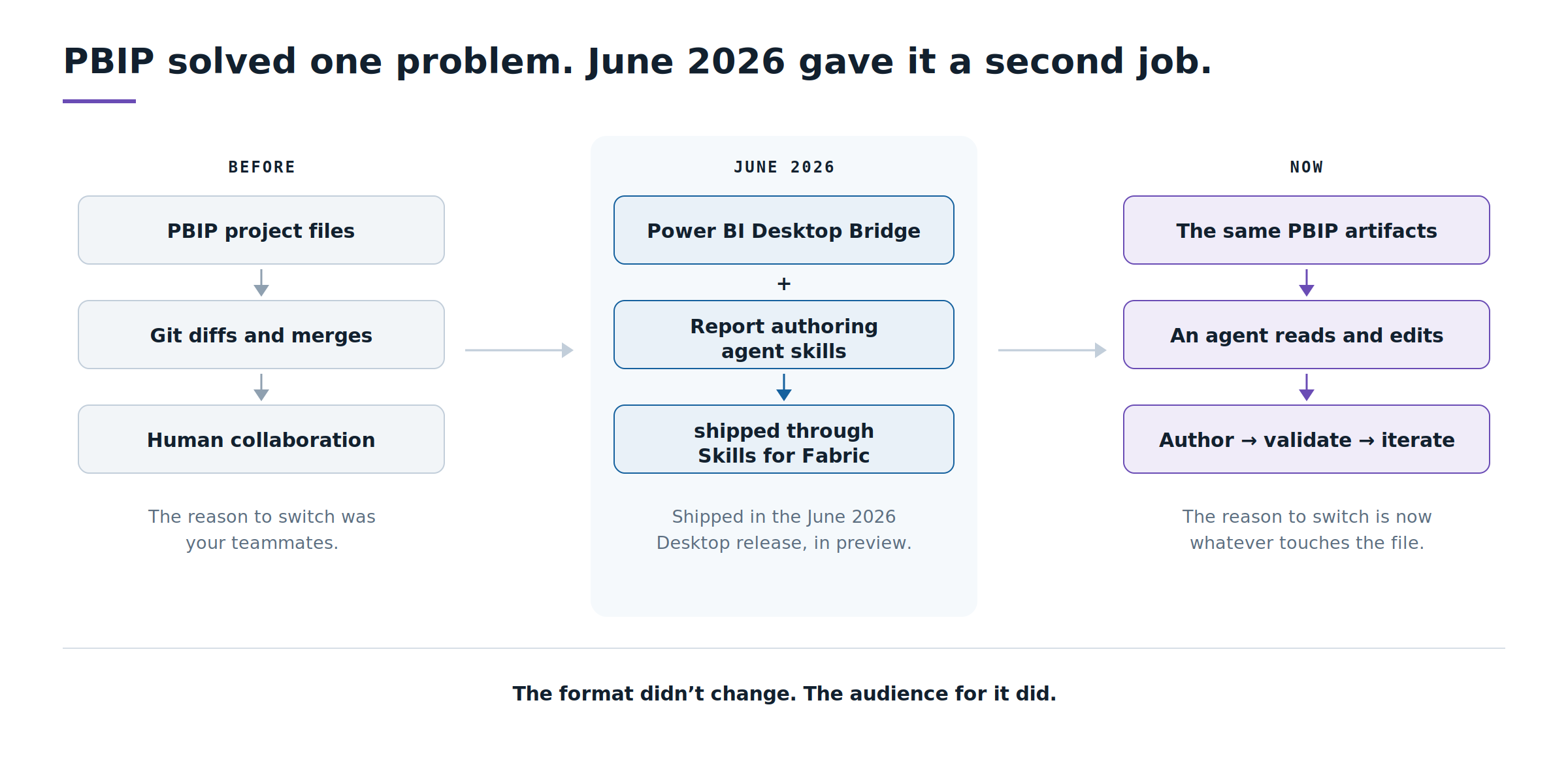
Two pieces landed in the June 2026 Power BI Desktop release (build 2.155.756.0). The first is the Power BI Desktop Bridge, in preview, which lets an outside tool connect to a Desktop session while it’s open. The second is a set of report authoring agent skills, distributed through Skills for Fabric, Microsoft’s first-party catalog of Fabric agent skills, initially tuned for GitHub Copilot CLI. They cover planning, design, authoring, validation, and publishing, driven by natural language.
Here’s the architecture that actually matters:

The most instructive thing about the Bridge is how little it does. Jihwan Kim, a Power BI MVP who wired an agent up to it against a real project in June, found that the Bridge has no write API at all. It reloads the open project from disk and captures a screenshot. That’s the entire contribution.
Every actual edit happens as a file change on disk. The Bridge only closes the feedback loop, and because the edits are file changes, each one lands as a reviewable diff rather than an invisible mutation inside a running application.
So the mental model isn’t agent → Power BI Desktop → changes. It’s agent → project artifacts → reload → screenshot → evaluate → iterate. None of that runs against a sealed PBIX.

Unpacking the artifact makes it accessible. That’s not the same as making it the right thing for an agent to manipulate directly.
Ruben Van de Voorde, an Innovation Specialist at Tabular Editor, recently pointed out that a single table definition in TMDL can run 79 lines and over 2,000 characters, more than 300 of which are nothing but the random ID codes the format requires. That’s not information an agent needs to reason about. It’s boilerplate the format demands regardless of what actually changed.
The lesson is about abstraction, not typing speed:
– ❌ Agent works directly against raw artifact syntax. It burns attention on structure that has nothing to do with the change, and one malformed ID means the file won’t open.
– ✅ Agent works through a purpose-built tool that emits valid artifacts, then reloads and screenshots to confirm the change did what was intended.
The process of creating the artifact is becoming more automated. However, the decision about what should be altered and whether the outcome is truly accurate remains a human task. That distinction only exists because the underlying files are understandable to begin with.
The technology story is the easy half. Here’s what changes in the work.
Developers become reviewers. Less time placing visuals and writing the tenth variation of a measure; more time specifying intent clearly and judging whether what came back is right. That’s a different skill, and it’s the one that gets scarce.
The semantic model carries more weight than it ever has. An agent generates fast against whatever it’s given. Vague table names, undocumented measures, and a model shaped for one report’s convenience all get amplified at speed. Model quality stops being hygiene and becomes the ceiling on output quality.
Version control becomes a safety mechanism, not paperwork. When a non-human contributor is changing files, Git stops being about who overwrote whose work. It becomes the record of what changed, the place a human approves it, the rollback when it’s wrong, and the accountability trail when someone asks who authorised the change. That’s a considerably better reason to adopt it than tidier diffs.
There is a migration timeline attached to all this, and it’s worth reading carefully, not because it’s urgent, but because it has slipped repeatedly and a lot of published commentary is out of date.
| Milestone | Where it actually stands, August 2026 |
|---|---|
|
PBIR default-on in the Power BI Service |
Began January 2026, then paused mid-rollout when problems appeared on a broader set of reports. Resumed in June. |
|
Scope of automatic conversion |
Staged by report size, as of March 2026, only reports with fewer than 100 visuals were eligible for automatic upgrade when edited in the Service. |
|
PBIR default in Power BI Desktop |
Slipped from March to May, now contingent on a clean Service rollout rather than a fixed release. |
|
PBIR and PBIP General Availability |
Follows the default-on rollout. Microsoft has stopped attaching a firm date to it. |
Two clarifications, because both are misreported.
What GA retires is PBIR-Legacy, the old report metadata format, not PBIX. Microsoft has been explicit that PBIX remains the primary file format for Power BI developers, and that for anyone who doesn’t care about source control, the change is silent: PBIX simply stores its report using PBIR internally instead of the legacy format. Nobody’s PBIX is being taken away.
And the known gaps are real. Sensitivity labels aren’t supported on Power BI projects. Windows’ 260-character path limit gets tight once long table and measure names become folder names. Some settings, including who’s allowed to see what data, still can’t be managed through Microsoft’s automation tooling on a PBIP. Worth knowing before you commit a large estate, not after.
If you were waiting for GA to force the decision, notice that the date has now moved more than once. That’s the weakest possible reason to move. The strong reason sits on your own roadmap: the first time somebody on your team wants an agent to build or repair a report.
None of this makes PBIX wrong. It makes the reasons for choosing it narrower than they used to be.
Building a quick sales-by-region view for a leadership call this afternoon. Handing a self-contained file to a colleague who just wants to open it and look at the numbers. Needing the data saved inside the file so it works offline. Prototyping something that may never become a real report. Working entirely solo. PBIX still does all of that with less setup than PBIP asks for.
There’s a wrinkle that cuts the same way: even a fully agent-ready PBIP project isn’t free of PBIX. Publishing straight from Power BI Desktop still generates a temporary PBIX behind the scenes — the one path, unlike Git or Microsoft’s deployment tools, that carries your saved-offline data along with everything else. The two formats never fully stopped touching.
It’s the shape of the work. If an agent is going to author or modify the report, you need an artifact representation that it can inspect and change.
| If you need… | Choose |
|---|---|
|
A quick standalone analysis |
PBIX |
|
Self-contained, offline data in the file |
PBIX |
|
A throwaway prototype |
PBIX |
|
Collaborative development and code review |
PBIP |
|
Source control, diffs, rollback |
PBIP |
|
Agent-assisted authoring |
PBIP |
|
Repeatable, testable engineering workflows |
PBIP |
Read the table by workload, not by headcount. A team of twelve building disposable one-off views is fine on PBIX. A single developer who wants an agent in the loop isn’t.
A PBIX file was always a locked box to one audience: the teammate trying to review a change they couldn’t see. This year it became a locked box to a second one: an agent that can build a page and check its own work, but only if it can get inside the file at all.
Which reframes what a Power BI file even is. It used to be a container for a finished thing. It’s becoming an interface, the surface where a developer, a review process, and an AI agent all have to meet and understand the same artifact.
PBIP isn’t a better way to store a Power BI report. It’s what makes the report legible to the tools that are going to build, test, and maintain it.
– Are you planning to try AI report generation or GitHub Copilot CLI soon?
– Do your report names or tables use very long naming conventions?
– Do your reports require strict security/sensitivity labels?

Navigation